Send your PDF as a link. Know when it’s read.
PDF to Link Converter turns your PDF into a short link that opens in any browser. Add a password, swap the file later without changing the link, and see how often it is opened.
Drop your PDF here
Up to 10 MB without an account. You get the link straight away.
No account needed PDFs up to 10 MB Passwords free on every plan


The dashboard’s Overview · every new account opens on this sample workspace
One link. Paste it anywhere people already talk
Documents
Every PDF you share, in one place.
Folders show the first pages of what is inside them. Switch to the file list when you want to sort by views, size, or the last time someone opened a document.
- Drag PDFs in; drag documents onto folders
- Search, sort and select several at once
- A new account starts with these samples, so nothing is empty
Analytics
See when it is opened, and how far people read.
Every link counts its views, on every plan. With PRO, on any paid plan, you also see unique visitors, countries, devices, where people came from (QR scans included), the pages they reached and how long they stayed.
- No cookies and no stored IP addresses
- Your own views are not counted
- Numbers arrive as the views happen
Link control
One link. You stay in charge of it.
An attachment is a copy you can no longer reach. A link still answers to you after it has been sent.
- Replace the file: the link and its QR code stay the same
- A password, an expiry date, a view limit and your own link name
- View-only or downloadable, or switch the whole link off
- All of it free, on every plan
PDF tools · PRO
Fix the PDF before you send it.
Sign it, split it, put the pages in order, black out a number, make it lighter, without leaving your documents. Part of PRO, which comes with every paid plan.
- Ten tools in your dashboard, with any paid plan
- Save the result behind the same link, or as a new document
- The work happens in your browser; honest about what each tool does
- Merge PDFJoin several PDFs into one file, in the order you choose.
- Split PDFCut one PDF into several: by page ranges, every few pages, or the pages you pick.
- Organise pagesDrag pages into a new order; rotate, delete, duplicate or add a blank one.
- Rotate PDFTurn every page, or only the sideways ones, and save them that way.
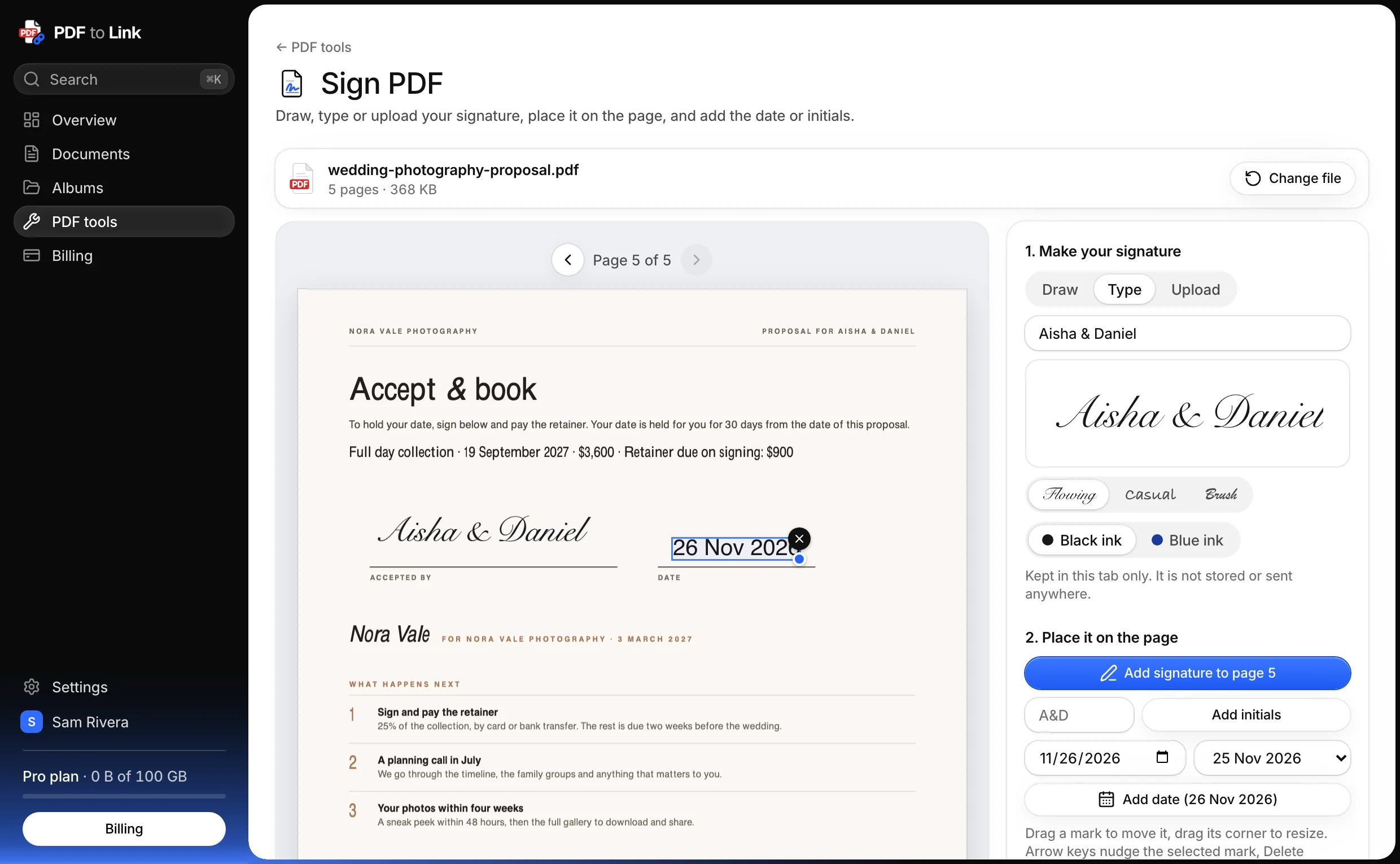
- Sign PDFDraw, type or upload your signature, place it on the page, and add the date or initials.
- Add page numbersNumber the pages where you want them, starting from any page.
- Watermark PDFPut a word or a logo across every page, as faint or as bold as you like.
- Redact PDFBlack out names, numbers and anything else, and remove what was underneath for good.
- Compress PDFMake a heavy PDF lighter and see exactly how much smaller it got.
- PDF to imagesSave each page as a PNG or JPG picture, zipped together.
Viewer
Opens in any browser. Nothing to install.
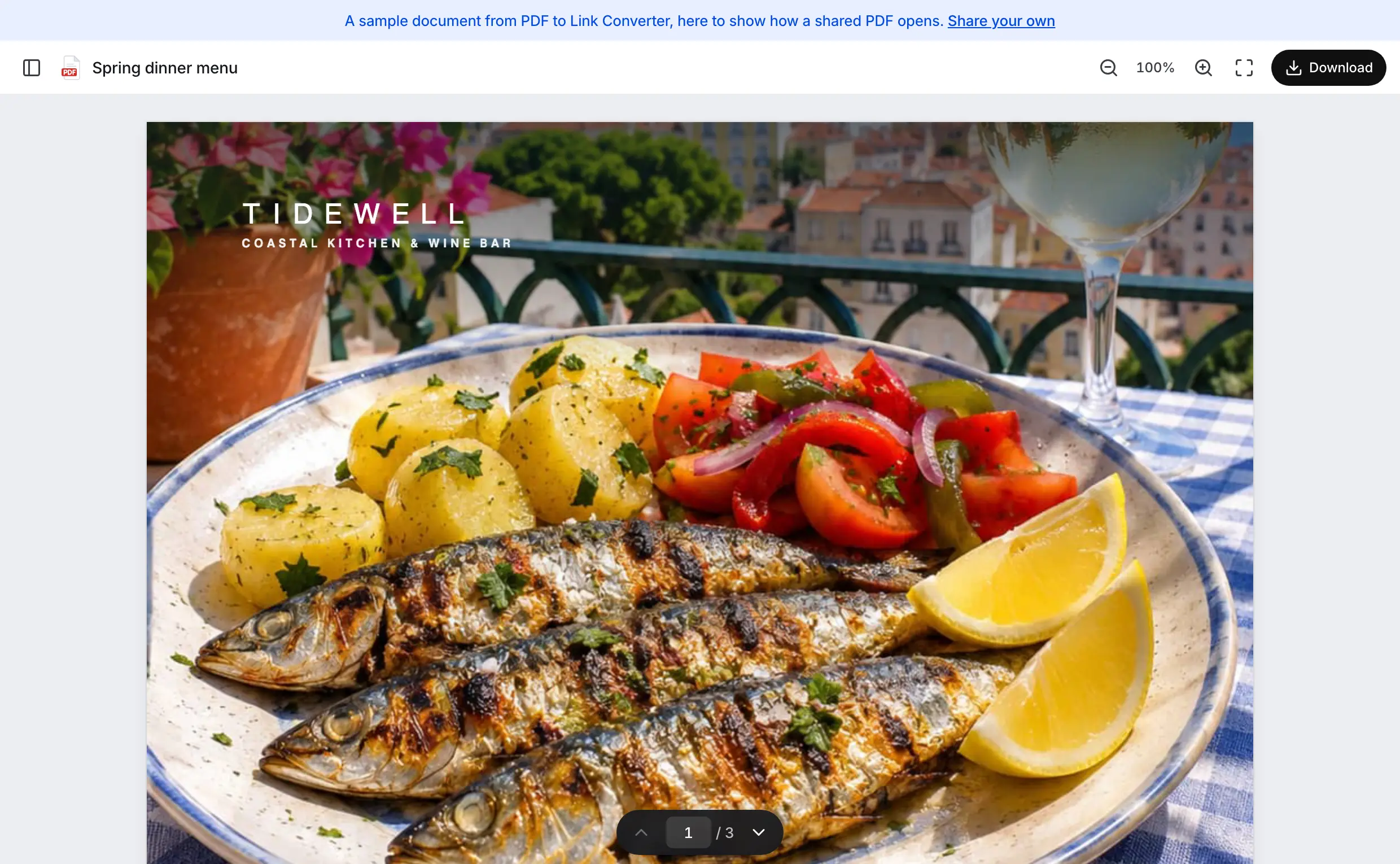
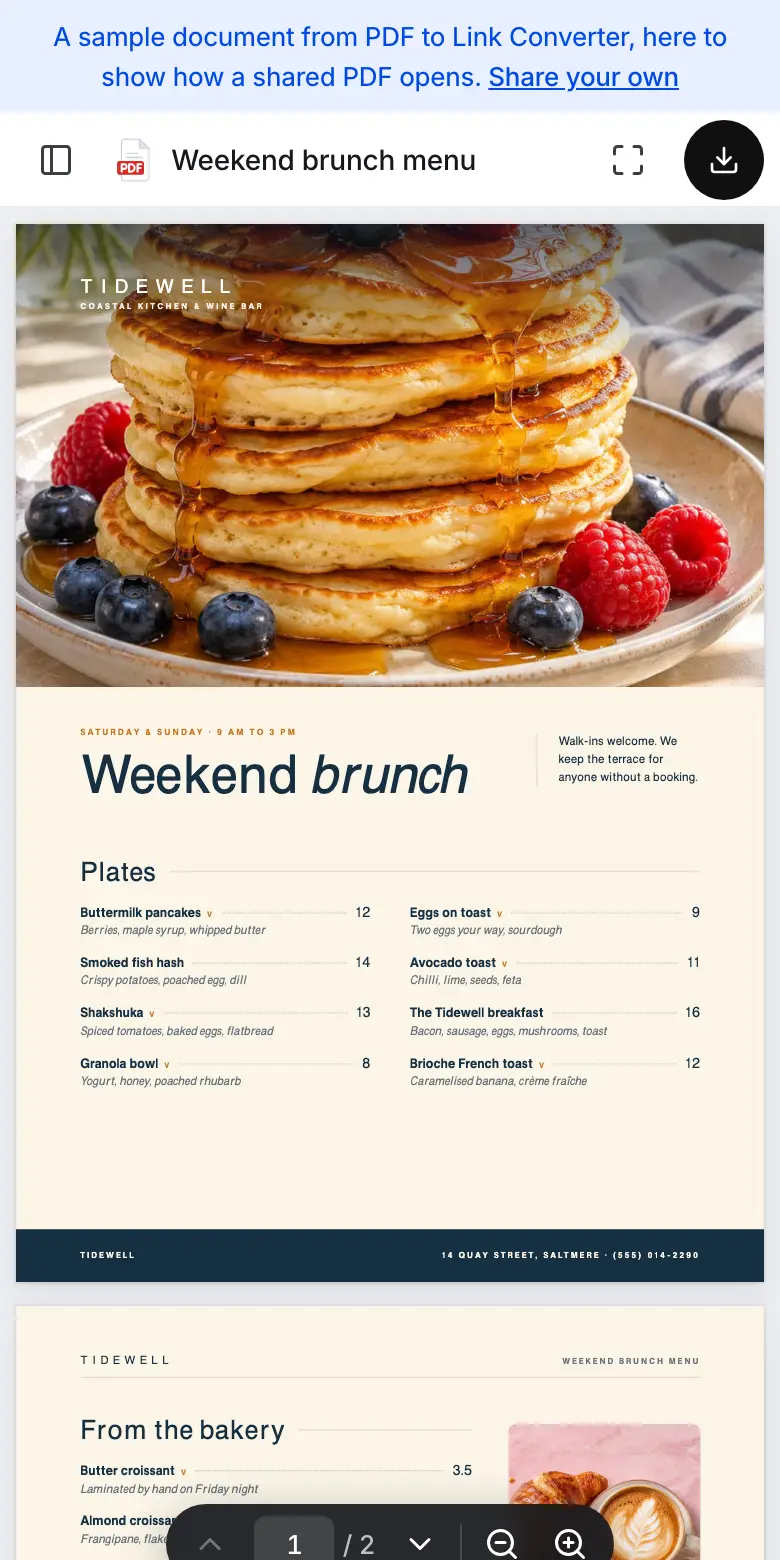
Whoever opens your link gets a fast reader instead of a download prompt. It is the same on a laptop and on a phone.
- The first page shows before the file has finished loading
- Thumbnails, zoom, full screen and text you can select
- Built for phones, where PDF attachments are clumsy
As it happens
Each open lands in your dashboard.
The view, the country, the device and where the reader came from. These rows are the sample workspace’s feed; yours fills in from your first link.
- OPENEDSummer market programmeGermany · phonevia google.com+1 view
- OPENEDSpring bike catalogueFrance · computerdirect+1 view
- OPENEDWeekend brunch menuCanada · phonedirect+1 view
- OPENEDSummer market programmeUnited States · tabletvia linkedin.com+1 view
- OPENEDWeekend brunch menuUnited States · computerdirect+1 view
- OPENEDOpen-air cinema ticketPortugal · phonedirect+1 view
In short
What a PDF link is.
A PDF link is a web address that opens your PDF in the reader’s browser. The file stays in one place, so after you have sent the link you can still count its views, protect it, replace the file or switch it off.
| E-mail attachment | PDF link | |
|---|---|---|
| File size | Most e-mail services refuse attachments over 20 to 25 MB. | 5 MB on Free, files up to 3 GB on Small and 4 GB on Pro and Lifetime. |
| After you send it | The copy is out of your hands. A typo stays a typo. | Replace the file and the same link opens the new version, on every plan. |
| Knowing it was read | No way to tell. | Every link counts its views. Any paid plan adds visitors, countries, devices, QR scans and pages read. |
| Who can open it | Anyone the file is forwarded to, for good. | Anyone with the link, until you switch it off. Add a password, an expiry date or a view limit, free. |
| On a phone | A download, then whatever app opens PDFs. | Opens in the browser, page by page. |
| On paper | Nothing to print. | Every link has a QR code, as PNG or SVG. |
More in PDF to link: how it works, sending a large PDF and the facts about PDF to Link Converter.
Pricing
Every link feature is free. Pay for room and PRO.
Free keeps 5 MB with passwords, expiry dates, view limits and custom link names. Paid plans add storage and PRO: advanced analytics, the PDF tools, an e-mail gate, open alerts, shared folders and your branding.
No card needed.
- 5 MB of storage, any number of links that fit
- Password, expiry date, view limit, custom link name
- View-only or downloadable; replace the file, keep the link
- View counts and a QR code for every link
- The viewer shows a small badge
Billed monthly. Cancel any time.
- 30 GB of storage
- Files up to 3 GB each
- Unlimited links
- Everything in Free
- PRO: advanced analytics, PDF tools, e-mail gate, alerts, shared folders, your branding and more
7-day free trial, $0 today. $4.08 a month, billed yearly. Save $59 a year.
- 100 GB of storage
- Files up to 4 GB each
- Unlimited links
- Everything in Free
- PRO: advanced analytics, PDF tools, e-mail gate, alerts, shared folders, your branding and more
One payment, no subscription.
- 100 GB of storage
- Files up to 4 GB each
- Unlimited links
- Everything in Free
- PRO: advanced analytics, PDF tools, e-mail gate, alerts, shared folders, your branding and more
- 7-day free trial on Pro$0 today. Your card is taken at checkout and charged when the trial ends, unless you cancel first.
- Cancel any timeFrom Billing, in two clicks. You keep the plan to the end of the period you paid for. Every payment has a 14-day money-back guarantee.
- Paused, never deletedIf a plan ends, links that do not fit Free’s 5 MB pause and uploads stop. Nothing is deleted, and everything resumes when you subscribe again.
Questions
Before you send your first link.
How do I turn a PDF into a link?
Drop the PDF on the box at the top of the page. It uploads, and a short link appears that you can copy and send. Anyone who opens the link sees the document in their browser.
Do I need an account?
Not to start. Links made without an account work for 7 days and take files up to 10 MB. A free account keeps 5 MB of documents, with links that stay live for as long as you are on Free, and shows how often each is opened. If you sign up in the same browser, the links you already made move to your account as long as they fit.
What does the person opening the link need?
A web browser. There is nothing to install and no sign-in. The viewer works on phones, tablets and computers.
Can I password-protect a PDF link?
Yes, on every plan, Free included. Add a password right after uploading or from the link's settings, and change or remove it at any time. Visitors type it before the document loads, and no preview of a protected document is shown. We store only a one-way hash of the password.
Can I update the PDF without changing the link?
Yes, on every plan. Upload the new file from the link's settings: the address, the QR code and the view count all stay the same, and people who already have the link see the new version.
Can I share several PDFs with one link?
Yes, two ways. On every plan, choose several PDFs when you upload and merge them into one document behind one link. With any paid plan you can also share a whole folder as one link: it opens a page with every document in the folder, each in the viewer, with a download-all button. The link always shows what is in the folder now, so moving a document in or out updates it, and the folder's link can have its own password, expiry date and e-mail gate while each document keeps its own settings.
What do the analytics show, and what about privacy?
Every plan counts the views of every link. Any paid plan adds advanced analytics: unique visitors, reading time, how far people read, countries, device types, referring sites and QR scans. We use no cookies for this and store no IP addresses: a visitor is counted with a hash that changes every day and cannot be reversed.
Is my document private?
Only people with the link can open it, and document pages are marked so search engines do not list them. For anything sensitive, add a password, an expiry date or a view limit, all free. You can switch a link off or delete the document at any time.
How big can the PDF be?
5 MB on Free (which is also its total storage), 3 GB per file on Small and 4 GB per file on Pro and Lifetime. Large files still open quickly, because the viewer loads only the pages being read.
Can I cancel a paid plan?
Any time, from Billing in your dashboard. You keep the plan until the end of the period you paid for, then the account moves to Free. Nothing is deleted: links that do not fit Free's 5 MB are paused and uploads stop until you subscribe again or delete files.
Your PDF, as a link, in under a minute.
No account for the first one. Keep it, add a password and count its views with a free account.
Private by default: only people with the link can open it